Packet
At the end of 2025 and beginning of 2026 I started to have a play around with some older technologies. ones that i thought might be dead and buried. One of those was packet (or AX25). It turns out that this mode is still in use and that there are quite a few nodes kicking about and there are even quite a few wikis kicking about offering help to get going.
It also turns out that packet is still a ’tech heavy’ mode. There is a lot of jargon and complicated setup, which is the opposite to what I found with the more modern interpretations of this like Meshtastic BBS’s. This was not going to be an evening project. So these notes are a sort of reminder for what I ended up doing. If something doesn’t quite work I’ll amend the notes to reflect the changes as I go along. Hence its work in progress.
Summary
As my experience in packet is very limited and circa 1990 I chose to step into it slowly. Turns out it was slower than even I imagined. The rough order of play is as follows:
- Use a zero cost approach and see what I can get. I have a computer and an IC7300 for HF and an FT817 for QRP stuff that also has a data capability. This means using a sound modem instead of a hardware TNC for audio work. The goal is to connect to another node and poke about. Either with HF or VHF. If I can do this then…
- Get hold of a hardware TNC (preferably 2) and liberate an under utilised RPi 3 to build a node. Do some local testing to connect into the node, firstly with Telnet and then with RF to check that the node can be accessed and there’s nothing daft going on.
- Get hold of an old PMR rig and build a proper node
Progress
Lets break this down a bit so it all makes sense. These are the basic steps of where I am with things. Building knowledge as I go through.
✅ - No cost sound modem
✅ - Preliminary Raspberry Pi node setup (LinBPQ)
✅ - Hardware TNC buying/building
✅ - PMR Rig buying/setting up
🚧 - RF testing at home
🚧 - Coerce a few locals to try out the node
✅ - Linking to other nodes
❌ - Box it all up and set it to work
No cost sound modem
There are a couple of things needed for this. One is the sound modem itself, the other it the way we need to interact with it. After a bit of reading up on Hibby’s Guide and the Online Amateur Radio Club (OARC) Wiki I plumped for QtSoundModem and QtTermTCP. They seem to be fairly common and developed by teh same person who developed LinBPQ so I assumed it’s all going to be straightforward. Ha!
My recommendation after a bit of hit and miss is to install the Hibby Repo. Yes, this is for Linux and yes there are other ways but I found this to be the easiest (I also used this for the LinBPQ build later). For those that like to skip the code is…
cd /tmp
wget https://guide.hibbian.org/static/files/setup.sh
chmod +x /tmp/setup.sh
sudo bash /tmp/setup.sh
Install the software in the usual way
sudo apt install qtsoundmodem qttermtcpOk, so everything is installed and all it needs it to be configured. Again, the Hibby guide is excellent. But, for IC7300 users like me I found it a right pain to get the rig to TX so the advice is to make offerings. It is a right royal pain to make it consistent. But here we go:
Under the Connectors settings
| Function | Value |
|---|---|
| ACC/USB Output Select | AF |
| ACC/USB AF Output Level | 60% |
| ACC/USB AF SQL | Off (Open) |
| ACC/USB AF Beep/Speech…Output | Off |
| ACC/USB IF Output Level | 50% |
| ACC Mod Level | 50% |
| USB Mod Level | 50% |
| Data Off Mod | MIC/ACC |
| Data Mod | USB |
Under CI-V Transceive settings
| Function | Value |
|---|---|
| CI-V Baud Rate | Auto |
| CI-V Address | 94h |
| CI-V Transceive | On |
| USB USB - REMOTE Transceive Address | 00h |
| CI-V Output (for ANT) | Off |
| CI-V USB Port | Unlink remote [REMOTE] |
| CI-V USB Baud Rate | Auto |
| CI-V USB Echo Back | OFF |
Under USB SEND/KEYING settings
| Function | Value |
|---|---|
| USB SEND | RTS |
| USB Keying (CW) | Off |
| USB Keying (RTTY) | DTR |
| Inhibit Timer at USB Connection | Off |
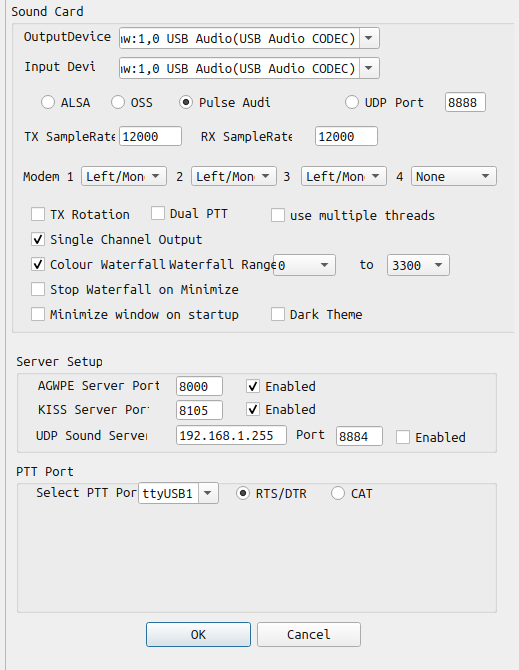
Even after setting this up my Ubuntu machine still had moments where it refused to TX. This is definitely not a favourite feature of the IC7300. It was outstanding frustrating and there is very little to explain why and how to prevent it being a muppet. Ok, so gripe over. The settings on the soundmodem were as per Hibby’s guide. But here are modems that worked consistently for me. Set the dial frequency to 7.049.45 USB (DATA) and with modems set as per the image below
After a while you should see data packets being decoded. Bear in mind that I live in the north west of England (IO84) the HF stations near you might be slightly different so a bit of trial and error might be needed.
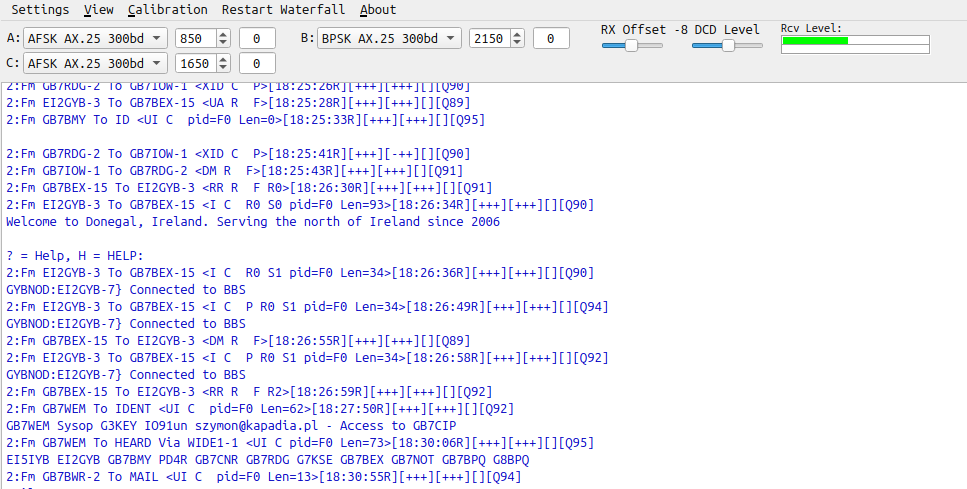
Now to connect to a station, Hibby’s guide is helpful here, but to be really specific I used the AGW Connection to EI5IYB-1 on Port 2 Soundcard Ch B and after a few seconds of to and fro I go a response from EI5IYB. Be patient, its 300 baud so isn’t going to be quick and I got quite a few disconnections at first, which I put down to the poor HF propagation at the time

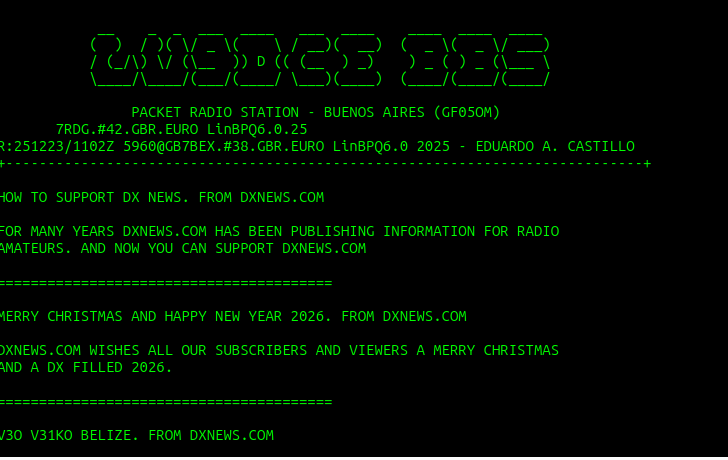
Once in you can use the ? command to find out more or make use of the LinBPQ Cheat Sheet. You can start poking around and enjoying packet radio. Don’t be surprised if the connection drops on HF. It seems to be a common occurrence for me, just reconnect and go back
Preliminary Raspberry Pi node setup (LinBPQ)
This could have been easy, but wasn’t. First I flashed a fresh version of Raspbian Lite on my Pi and tried to install everything via the same Hibby repo as above.
Not happy
Actually read the instructions this time and realised it didn’t like that OS, so changed it to the desktop version that was compatible. It all installed corrected but none of the changes to the configuration file seemed to save and so I was basically locked out
The 3rd attempt noticed some amended information on a wiki and used Raspbian Trixie Lite with a command line install, without any config file builder. Just used nano to update the config file and all is well. I have a working LinBPQ setup. But this is not the end of it. The config file needs a bit of work. After a while I came across some example config files that worked. These are on the Packetradio.net BPQ32 pages. There seems to be no complete.
So far testing via telnet seems to be working nicely
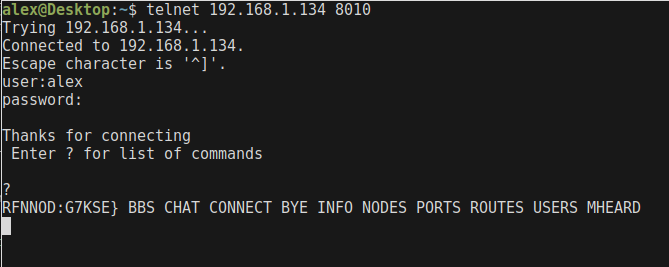
Seeing this give me some confidence that LinBPQ is setup correctly for basic operations. We’ll get stuck into linking and AXIP at some point I expect, it’s here that is starts to get more complicated and my understanding goes through thr floor at the moment. I suspect I’ll be asking for help!
Hardware TNC buying/building
✅ - Nino TNC 🚧 - Second TNC (needed for local testing on VHF)
I ordered a Nino TNC kit from Hamserve for £35 and had it knocked up in an hour or so. despite checking things I still managed to solder one part in wrong, so it took me a while to de-solder it without killing the board.
The build instructions at TAPR are very good, so no need to go over that, as were the setting to work instructions. For completeness the operator instructions are also linked here.
I’ve managed to source an older PK-88 that may or may not work for testing with local stuff. This should arrive at some point and once I have enough hardware and confidence in the LinBPQ setup (it seems to be ok on Telnet) then I’ll conduct some more thorough stuff.
PMR Rig buying/setting up
After a load of looking I settled on a rather ratty Tait T8110 of eBay. There is a lot of useful information on transceivers on the OARC Wiki. So it was just a matter of finding a suitably cheap transceiver and pressing the ‘buy’ button. Once it arrived I used the additional power cable and programming cable to do its thing. Then give it a local test to check there was RF coming out. All successful.
Some useful resources for programming are also on the wiki that includes a basic packet setup that works. I did have a bit of a panic as the unit wouldn’t change channels when it originally arrived, but wiping the memory and uploading the boilerplate from OARC worked.
RF testing at home
Coerce a few locals to try out the node
Linking to other nodes
Box it all up and set it to work
Useful references
By no means and exhaustive list but links to things I found useful to read up on. There are quite a few videos floating about, some of them sort of conflict or overlap with others but in general The Modern Ham and PE1RRR ones were the ones I found most useful.
General stuff
Hibby’s Guide - Really handy and mostly complete
OARC Packet Wiki
Packet Node Map - BPQ nodes from what I can tell
The Modern Ham - A good general resource
PE1RRR’s guides and general information as well as some detailed stuff
LinBPQ cheat Sheet - Handy for commands
Really specific stuff
Farpn Wiki LinBPQ config
OARC BPQ for beginners
Packetradio.net BPQ config examples
Nino TNC - Information for building and operating
Nino TNC UK supply through Hamserve
Map of UK packet nodes (including APRS)
---